
One view for each job
Project management for your orders and purchasing.
Put the sales orders and purchase orders of one job in a project. Shypr shows the value, the margin, what is invoiced and a timeline up to the deadline.
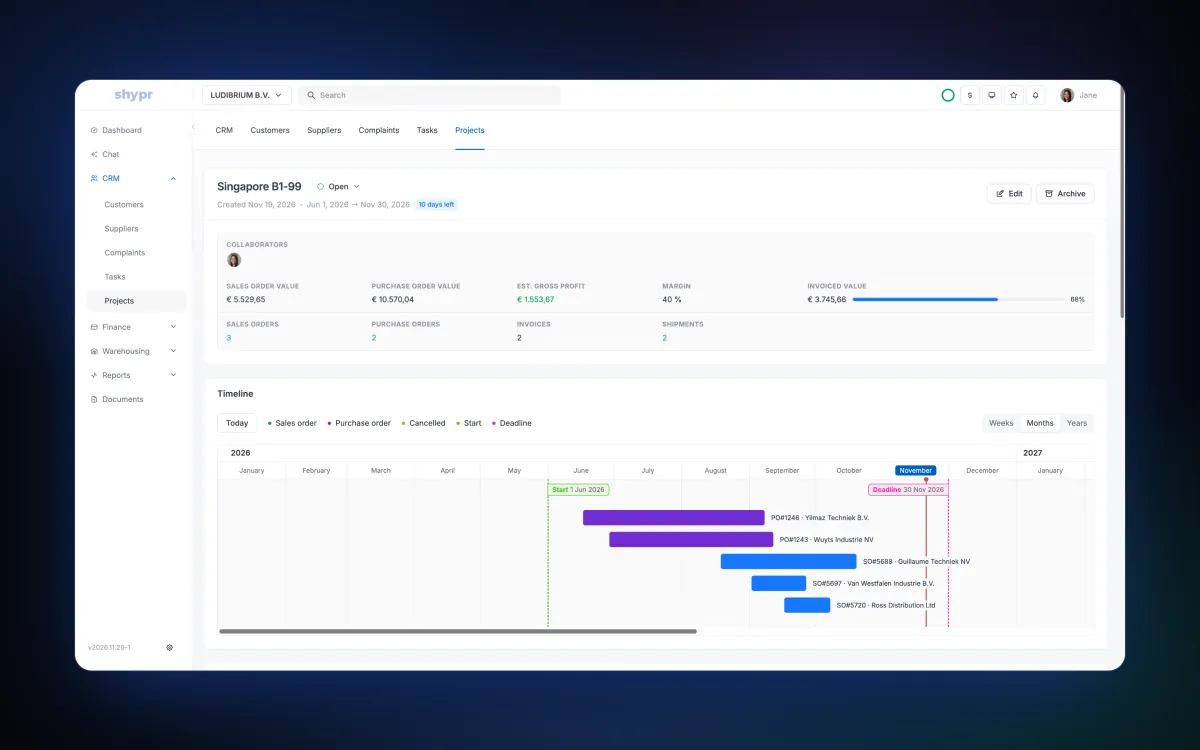
Know where each job stands.
A project collects the orders of one job, for one or more customers and suppliers. It has a start date, a deadline, a status and a team. Shypr adds up the numbers from the orders, so you do not keep a separate project sheet.
Value and margin at a glance
See the sales order value, the purchase order value, the estimated gross profit and the margin. A bar shows how much of the sales order value is invoiced.
A timeline up to the deadline
Each order is a bar, from the order date to the ship date. Lines mark the start, today and the deadline. Zoom out from weeks to months or years.
Everything about the job together
Open the sales orders, purchase orders, shipments and complaints of the project in tabs. Add attachments and notes for the team.
Run a project
From first order to deadline.
Set up a project in four steps. Shypr keeps the numbers up to date while the orders move.
Quotes, orders and invoices Purchasing
-
Create the project
Give it a name, a start date and a deadline. Add the collaborators.
-
Link the orders
Select the project on each sales order and purchase order of the job.
-
Follow the numbers
See the value, the margin and the invoiced part change as you invoice and ship.
-
Close it
Set the status to Completed or Cancelled, or archive the project when the job is done.
FAQ
Questions about projects.
Which orders can I add to a project?
Sales orders and purchase orders. Open the order and select the project. The shipments, invoices and complaints of these orders then show in the project too.
How does Shypr calculate the profit and the margin?
Shypr subtracts the cost of goods of the sales order lines from the sales order value. When a line has no cost, or an order has no exchange rate, Shypr tells you that it is not in the totals.
Can I see my own projects?
Yes. Each project has collaborators. The dashboard shows the projects where you are a collaborator, and the customer and supplier pages show their projects.
Which plan includes projects?
All plans. Projects are part of the CRM, which every plan includes.
One system, every step.
Each part of Shypr works on the same data. Read how the other parts work.
Features
Your orders. Shipped, with Shypr.
Stop chasing orders across spreadsheets and inboxes. Start your free trial today and send your first quote in minutes. We import your customers, products and stock for free, so you work with your own data from day one.
 Ready in minutes
- Free data import
- Cancel any time

