
ERP for distributors
The ERP for distributors that ship at home and abroad.
Shypr is a cloud ERP for distributors. Book goods in with lot numbers, ship from packing lists and add HS codes for customs, all from the same order.
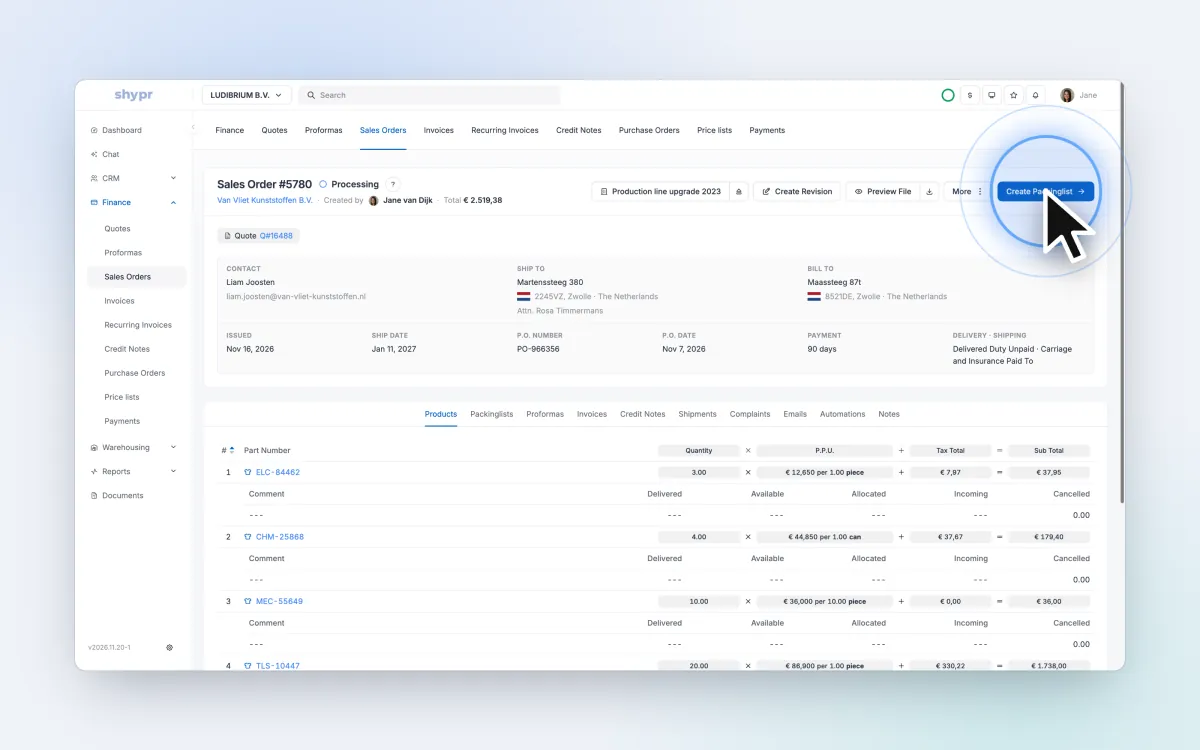
From supplier to customer, in one flow.
A distributor moves products from suppliers to customers, often across borders. Shypr keeps the purchase order, the stock, the shipment and the invoice of each order connected.
Goods in with lot numbers
Book received goods against the purchase order. Shypr records the lot numbers on arrival.
Shipments ready for customs
Build the packing list from the sales order, record each package and add HS codes for shipments abroad.
The currency of your customer
Set a currency and payment terms for each customer, and add a bank account for each currency that you accept.
An order for a customer abroad
One international order, four steps.
The same order carries the lot, the packages, the HS codes and the invoice.
Packing and shipping Purchasing
-
Receive and record the lot
Book the goods against the purchase order, with their lot numbers.
-
Reserve the stock
Confirm the sales order, and Shypr reserves the stock for it.
-
Pack with HS codes
Build the packing list from the order, and add the HS codes for customs.
-
Invoice in the right currency
Create the invoice from the order, in the currency that you set for the customer.
FAQ
Questions about Shypr for distributors.
What does an ERP do for a distributor?
An ERP connects purchasing, stock, sales, shipping and invoices in one system. A distributor sees for each order what is in stock, what is reserved and what is shipped, without separate tools.
Can I trace a lot to a customer?
Yes. Shypr records the lot number when goods arrive, and you can trace the lot to the sales order and the customer.
Does Shypr support shipments abroad?
Yes. Add HS codes to your packing lists for customs, and set a currency and payment terms for each customer.
Does Shypr support multiple currencies?
Yes. Set a preferred currency for each customer, and add a bank account for each currency that you accept. Multiple currencies are part of the Yacht and Titanic plans.
One system, every step.
Each part of Shypr works on the same data. Read how the other parts work.
Features
Your orders. Shipped, with Shypr.
Stop chasing orders across spreadsheets and inboxes. Start your free trial today and send your first quote in minutes. We import your customers, products and stock for free, so you work with your own data from day one.
 Ready in minutes
- Free data import
- Cancel any time

